How to use MovieBoxpro gift Code

Actually users are unable to follow any gift or promo code regarding this application for Ios, Android, TV and PC. Application developers are never promoting any gift code to touch with premium resources. However, We like to give all necessary guides related to the MovieBox and also MovieBoxpro applications.



Is it possible to get official gift codes ?

Actually MovieBoxpro development team never release any gift code for users. However MovieBox team is providing code called “Promo Code”, This will help to touch with premium resources. Perhaps, some sites selling gift code for users, these sites are often charge money and personal information from users. Many of these sites are scams and those are violate application developers terms and conditions.

Truth about gift code/ Invitation Code / Promo code

MovieBoxpro invitation code is providing by development team for limited users. This code can generate already installed account for each month. So every users can create new invitation code each month for other users. This code is issuing for your friends and family members, These generated codes are unique and validated period is only 15 minutes of time. Therefore users are unable to follow this time limited code after 15 minutes.

Our recommended ways to get this application Invitation code

  • Existing account holder

If you already have current member, each member can generate code. Please follow our guides before install for your account.

  • Request with development or support team

This is mainly depend with the traffic and requested messages. Application support team will provide activation link or code for your email address. This code will not have limited time period.

  • Sharing with other websites

We have seen some users are sharing these codes via social sites like Reddit, Facebook, X, LinkedIn etc. These codes are valuable to you. However you need to touch with code while application installation process, Because generated codes are valid only few minutes of time.

Important for All users

MovieBoxpro gift code means invitation code, Which is free random generated code for users. All users are require to consider with following factors.

Payment details – Some third party sites are claiming for the codes, Please avoid your personal payment details with those sites.

Sellers – We have seen some social bookmarking sites are selling codes for users. You need to beware with unreliable sources.

Benefits of Getting Gift Code / Invitation Code

You have many features after activating account for your device. We can simply mention following features.

  • Lifetime access membership area free for All users
  • Thousands of updated movie database ready online and offline.
  • Movies can be stream with other devices and you can download it with different formats with free of charge.

Most users are interesting with this application activate application with proper gift code or invitation code. If you required code to activate your account, We like to help with our already installed account with free of charge. Are you new comer to this application ? Please message with our Facebook page to get valid code for your device. We thought, Our guides will help to give better result for you. If any question regarding this gift code, Please message or comment to us. Have a very nice day.
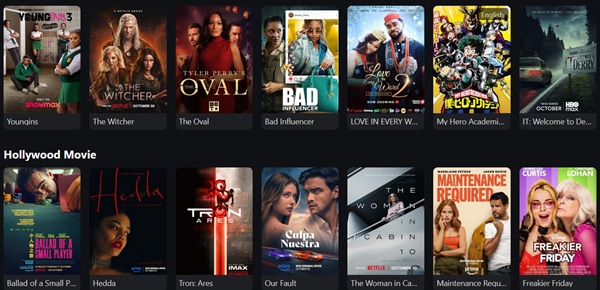

How to install MovieBox Pro for iOS 18/ 19 Latest versions

Your favorite MovieBox Pro application can install for iOS 18 and upcoming 19 versions. This moment application is compatible with the Apple iOS 19 beta version. We have successfully install this application for iOS 19 beta version without jailbreaking. This will be really happy news for all users to download MovieBox Pro application without Cydia. Actually Cydia is becoming outdated application because many Cydia store applications are now available to install without jailbreaking. We can mention most effective guides for our loving users as follows. All of the these methods are available with non-jailbroken devices.

Sideload app with AltStore and Sideloadly – PC Methods

AltStore

This is one of the best application can use to sideload apps for your devices. AltStore is computer based method which can use to install IPA files for your device. You can follow below steps to install application with AltStore.

Steps :

  • This application is unable to install online for your device. Please install AltStore application for your computer (Windows/macOS).
  • Then download MovieBox Pro IPA file and Connect your device to computer with USB cable
  • Install Application, You can install MovieBox Pro application after drag and drop or select file with AltStore application.
  • After installation completed, Trust the developer certificate under profile and device management.
  • Re-Signed every seven days to keep application forever with your device. If you have paid Apple Developer account, This resigned period will be longer.

Sideloadly

This is one of the most popular method most users are following to install applications for their iPhone, iPad, iPod Touch. As previous installation method, You can use this method to download applications without jailbreaking.

Steps :

  • First download and install Sideloadly application for Your Windows, macOS, Linux Platform
  • Then follow our trusted source and download MovieBox Pro application IPA file for your device
  • Now you need to connect device to PC using USB cable, This stage trust device to synchronize application for your device.
  • Now execute Sideloadly application and drag and drop IPA file to the application, Enter your Apple ID credentials to sign the application.
  • Perhaps you may required to trust the developer Profile. Please follow these steps on your device, Settings > General > Profile and Device Management > Trust Certificate.
  • Now you have completed application installation successfully. You may required to reinstall application every 7 days (If you do not have Apple Developer account). If you already have developers account, Please follow your Developer account to continue application for one year time period.

KFPanda Player – Web-based method

This is one of the web based interface access method you can use to touch with MovieBox Pro account with Apple App Store.

Steps :

  • Open official Apple App Store and search application, Then download and install app for your iPhone, iPad, iPod Touch
  • Open KFPanda Player application and tap bottom + icon and add following , Name – MovieBox Pro, URL movieboxpro.app
  • Then tap Add button, Then you can see MovieBox Pro web interface with KFPanda Player application.
  • Now tap it and Log in your Google Account, Then your account will saved in the application. This will help to access to the account within few clicks.

You can follow above web based and non web based methods to install application successfully. If you have any issues during installation, feel free to message as comments !